What if you could take a single product photo and turn it into a cinematic luxury advertisement using just one AI video prompt?
You don’t necessarily need a camera crew, studio, expensive lighting setup, professional models, or a full production team.
With modern image-to-video AI tools, you can upload a product image and use a carefully structured prompt to guide the camera movement, product interaction, lighting, cinematic style, and overall visual storytelling.
In this guide, I’m sharing a ready-to-copy master prompt designed to create this type of premium product video from a single uploaded product image.
The prompt is intentionally written so that it can adapt to different products. Whether you’re working with a perfume bottle, skincare product, cosmetic container, beverage bottle, fashion accessory, gadget, or another physical product, the AI should use the uploaded image as the visual source of truth and adapt the scene accordingly.
Important: Results vary between AI video models. Some models handle multi-step sequences from one prompt better than others. For image-to-video generation, the uploaded image establishes the visual starting point, while the prompt should primarily control the motion, camera work, actions, and timing.
What You’ll Create
The goal is a short vertical product commercial with the visual language of a high-end beauty or luxury advertisement.
The video can include:
- A cinematic product establishing shot
- A slow macro camera push-in
- An extreme close-up of the product
- A subtle highlight moving across the surface
- A realistic human interaction with the product
- A lifestyle/product presentation shot
- A detailed macro action shot
- A final hero product shot
- Soft cinematic lighting
- Shallow depth of field
- Premium reflections and bokeh
The exact environment and product interaction should adapt to the uploaded product.
For example, a perfume bottle may naturally be shown being picked up and sprayed, while a pair of sunglasses could be picked up and worn, and a skincare product could be opened and applied.
The objective is not to force every product into the same scene. The AI should understand the uploaded product and create an appropriate luxury commercial around it.
The Secret: Use the Product Image as the Source of Truth
The most important part of this workflow is the reference image.
Upload a clean, high-quality product image whenever possible.
The image should clearly show:
- The complete product
- Product shape
- Color
- Packaging
- Cap or lid
- Logo
- Label
- Material
- Important design details
A strong source image gives the video model a much better visual starting point. Runway’s current image-to-video guidance similarly recommends using a high-quality input image and explains that the image establishes the composition, subject matter, lighting and style for the generated clip.
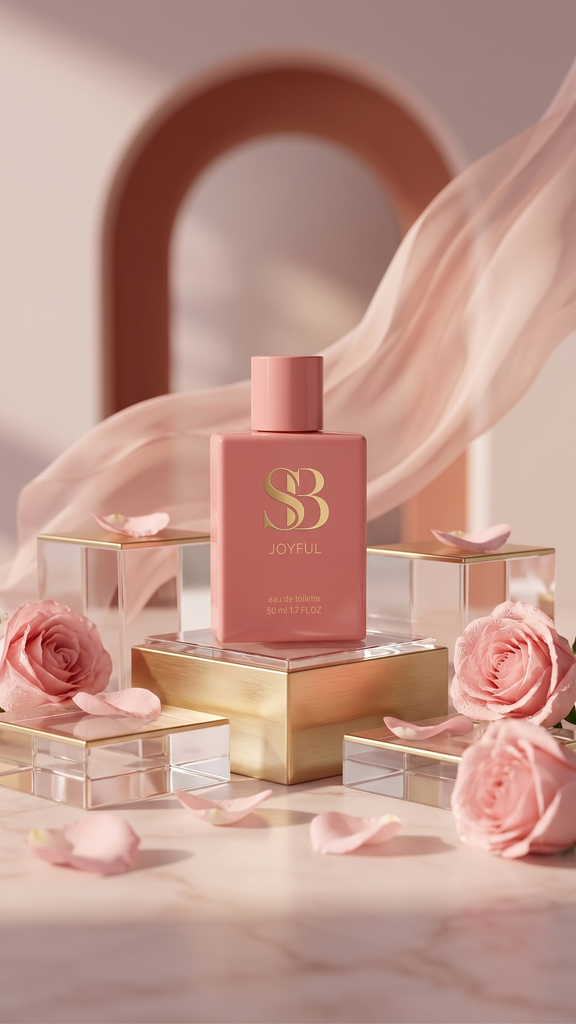
The One-Prompt AI Product Video Formula
The following prompt is designed as a single master prompt.
You upload your product image, paste this prompt, and let the AI interpret the product and create the commercial sequence.
Ready-to-Copy AI Product Video Prompt
Create a premium cinematic luxury product advertisement video using the uploaded product image as the exact visual reference for the product.

IMPORTANT: The uploaded image is the MASTER PRODUCT REFERENCE. Accurately preserve the exact product identity throughout the entire video, including its shape, proportions, size, color, material, cap or lid, packaging, label, logo, typography, surface details and overall design.

The product must remain visually consistent from beginning to end.

Create a sophisticated high-end commercial in the visual style of a luxury beauty, fragrance or premium lifestyle advertisement, automatically adapting the environment, props, lighting and product interaction to the type of product shown in the uploaded image.

VIDEO FORMAT:
Vertical 9:16, cinematic commercial, approximately 10 seconds, photorealistic, premium advertising quality.

VISUAL STYLE:
Elegant luxury product photography, soft cinematic lighting, beautiful shallow depth of field, macro cinematography, creamy bokeh, realistic reflections, subtle bloom, premium studio lighting, sophisticated color grading and polished commercial aesthetics.

SHOT SEQUENCE:

Begin with an elegant hero establishing shot of the uploaded product beautifully positioned in a premium environment that complements its design.

The camera performs a very slow cinematic macro dolly-in toward the product.

Then transition naturally into an extreme macro close-up revealing the product's finest details, such as its logo, label, texture, material, packaging or distinctive design features. A subtle moving studio highlight travels across the product surface.

Then introduce a realistic human interaction appropriate to the product. An elegant hand naturally approaches the product, gently touches it, picks it up, opens it, holds it or uses it, depending on what the product is.

For a perfume, fragrance or spray product, the hand may gently pick up the bottle and press the atomizer, releasing a fine realistic perfume mist.

For cosmetics or skincare, show an elegant natural interaction appropriate to the product.

For another type of product, automatically create a realistic interaction that makes sense for that product.

After the interaction, transition into a beautiful lifestyle-oriented product shot with a softly blurred premium background and cinematic depth of field.

Follow with an extreme macro detail shot showing an important functional or visual feature of the product, using realistic physical motion appropriate to the product.

Finally, create a stunning centered hero product shot on a premium surface, surrounded by subtle complementary elements, with a soft cinematic background and a gentle realistic reflection beneath the product.

CAMERA MOVEMENT:
Use extremely smooth and controlled professional commercial camera movement.

Begin with a very slow macro dolly-in.

Use a subtle lateral macro slide during the extreme close-up.

Use gentle controlled tracking when following the human interaction.

Use a slow cinematic push-in for the lifestyle product shot.

Use an almost locked-off macro camera during the detailed product action.

Finish with an almost completely static hero product shot with an imperceptible slow push-in.

All camera movement must feel deliberate, elegant and expensive.

MOTION:
Natural, physically realistic movement throughout.

Human hands and fingers move gracefully and realistically.

Product interactions follow realistic physical behavior.

Liquid, perfume mist, fabric, reflections and other physical elements move naturally.

Use subtle high-speed macro cinematography and a refined slow-motion feeling only when appropriate for the product action.

LIGHTING:
Use soft warm diffused beauty lighting, realistic studio highlights, subtle rim lighting, delicate shadows and natural-looking reflections.

Automatically adapt the lighting and color palette to complement the uploaded product.

For a feminine fragrance or beauty product, use sophisticated blush-pink, warm ivory, champagne or soft pastel tones.

For other products, intelligently adapt the color palette to the product's visual identity while maintaining a premium luxury aesthetic.

DEPTH OF FIELD:
Extremely shallow depth of field, macro lens aesthetic, creamy cinematic bokeh and smooth focus transitions.

Keep the product sharply detailed while allowing the surrounding environment to fall softly out of focus.

PRODUCT CONSISTENCY — CRITICAL:
Keep the uploaded product visually identical throughout the entire video.

Preserve the exact product shape, proportions, color, material, cap or lid, packaging, logo, label and typography.

Do not redesign the product.

Do not change its proportions.

Do not change its colors.

Do not alter the logo or label.

Do not create fictional branding.

Do not duplicate the product.

Do not morph the product between shots.

Do not make the product melt, deform or transform into another object.

The uploaded product must remain the unmistakable hero of the entire advertisement.

FINAL LOOK:
The finished video should look like a professionally produced luxury commercial created by a high-end advertising production studio.

Photorealistic.
Cinematic.
Elegant.
Premium.
Sophisticated.
Realistic physics.
Natural motion.
Beautiful composition.
High-end commercial cinematography.

The result should feel like a real product advertisement rather than an obviously AI-generated video.
Add a Premium Creator End Card
After generating the main product video, you can create a separate 2–3 second creator end card and attach it during editing.
This is especially useful if the video is being posted as an AI video showcase rather than as a real product advertisement.
Instead of suddenly switching to a completely different visual style, the end card below maintains the same luxury cinematic tone.
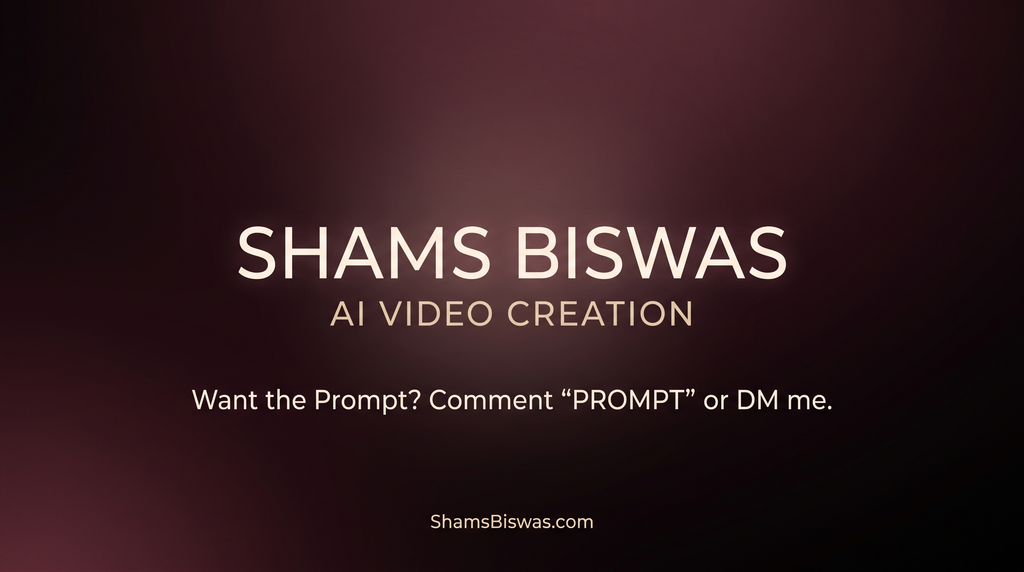
Ready-to-Copy Creator End Card Prompt
Create a 2.5–3 second premium cinematic creator end card designed to be placed immediately after a sophisticated luxury product advertisement.

The visual style must seamlessly match the previous video: elegant, minimal, cinematic, premium, sophisticated and visually polished.

This is a personal AI video creator showcase end card, not a product advertisement or corporate advertisement.

BACKGROUND:
A deep cinematic blush-black and dark burgundy background with extremely subtle warm pink undertones, a soft atmospheric gradient and a gentle diffused glow.

The background should feel luxurious and sophisticated, visually connected to a premium beauty or fragrance commercial.

Add only a very subtle soft light bloom behind the typography.

TYPOGRAPHY:
Centered, perfectly aligned, elegant modern premium typography.

Primary text:

SHAMS BISWAS

Directly underneath:

AI VIDEO CREATION

Below that with comfortable spacing:

Want the Prompt? Comment “PROMPT” or DM me.

At the bottom center:

ShamsBiswas.com

TEXT HIERARCHY:

1. SHAMS BISWAS — primary visual element
2. AI VIDEO CREATION — secondary identifier
3. Want the Prompt? Comment “PROMPT” or DM me. — clear CTA
4. ShamsBiswas.com — supporting website identity

TYPOGRAPHY STYLE:
Elegant modern luxury typography, clean, minimal, highly legible and professional.

Use warm ivory and soft white typography with extremely restrained champagne-gold accents.

The text must be crisp, perfectly spelled, highly legible and completely stable.

ANIMATION:
Begin with the dark cinematic background already visible.

Very subtle smooth fade-in of the complete typography.

The typography may have an extremely gentle cinematic glow during the first few frames.

After appearing, all text remains completely stable.

End with a clean static premium frame.

The following text must appear EXACTLY as written and spelled:

SHAMS BISWAS

AI VIDEO CREATION

Want the Prompt? Comment “PROMPT” or DM me.

ShamsBiswas.com

Overall result:
A refined 2.5–3 second luxury creator end card that feels like the natural final frame of a high-end cinematic AI product advertisement and clearly communicates that the video is an AI video creation showcase.
How to Use the Prompt
The workflow is simple.
Step 1: Prepare your product image
Use a clean, sharp product image where the entire product is clearly visible.
Avoid using a blurry or heavily compressed image. Problems in the source image can carry into the generated video.
Step 2: Upload the image
Open an AI video generator that supports Image-to-Video.
Upload your product image as the reference/start frame.
Step 3: Paste the master prompt
Copy the complete prompt above and paste it into the model’s prompt field.
Step 4: Generate the main clip
Use a vertical 9:16 format if your target is:
- Instagram Reels
- Facebook Reels
- TikTok
- YouTube Shorts
A 10-second generation is a good target for this concept, although the available duration depends on the AI video model you use.
Step 5: Generate the end card separately
Generate the 2.5–3 second creator end card as a separate clip.
This gives you much more control over the typography and final editing.
Step 6: Edit the clips together
Your final timeline can look like:
00:00–00:10
Luxury AI Product Commercial

00:10–00:13
Creator End Card

TOTAL:
Approximately 12.5–13 seconds
You can then make small timing adjustments in Premiere Pro, DaVinci Resolve, CapCut or another editor.
Why Use a Separate End Card?
Trying to force the creator branding into the same AI generation as the product commercial can introduce unnecessary problems.
Text generation is still one of the areas where generative video models can produce inconsistent results. Keeping the creator card separate gives you control over:
- Exact spelling
- Font
- Position
- CTA
- Website address
- Duration
- Branding
You can also create the end card directly in Premiere Pro or another editor if you want 100% accurate text.
How to Make the Product Video Look More Real
The prompt is important, but the reference image is equally important.
For the best result, use a product image with:
- Sharp edges
- Good resolution
- Clear product silhouette
- Visible label
- Even lighting
- Minimal visual clutter
- Enough empty space around the product
A clean product image gives the AI more reliable information about the object it needs to preserve.
Current image-to-video guidance also emphasizes that the input image establishes the starting composition and that prompts should focus on what changes over time—particularly subject action, camera movement and timing.
One important tip
Although the prompt above is intentionally detailed because it is designed to describe an entire commercial sequence, don’t keep adding more and more instructions if the first generation fails.
AI video models can become less predictable when instructions conflict.
A good workflow is:
- Generate the first version.
- Identify the biggest problem.
- Change only that part of the prompt.
- Generate again.
This is also consistent with current prompting guidance recommending clear, direct instructions and iterative refinement rather than unnecessarily complicated prompts.
Can One Prompt Really Generate the Whole Video?
Yes, some models can interpret a single prompt as a sequence of actions, especially when the prompt clearly describes what happens first, next and finally.
Sequential prompting can also use natural-language ordering or timestamps to give the model additional temporal structure.
However, there is an important practical distinction:
One prompt does not guarantee six perfectly controlled shots.
If you need precise commercial production control, generating shorter individual clips and editing them together is generally more controllable.
For a quick AI showcase, however, the single-prompt approach is extremely useful because it allows you to experiment quickly with different products.
Final Workflow
The complete process can be reduced to this:
Product Image → One Master Prompt → AI Video → Separate Creator End Card → Edit → Publish
You don’t need to rewrite the prompt for every product.
Simply change the uploaded product image and let the AI adapt the environment and interaction to the product.
That makes this approach useful not only for perfume bottles, but also for:
- Skincare
- Cosmetics
- Watches
- Jewelry
- Shoes
- Fashion accessories
- Gadgets
- Food packaging
- Beverage bottles
- Electronics
- Luxury lifestyle products
The key is to treat the uploaded image as the visual source of truth and the prompt as the director’s instructions for movement, camera work and storytelling.
Frequently Asked Questions
Can I use any product image?
Yes. However, a clean, sharp product image with a clearly visible product generally gives the model a better starting point.
Does this prompt work only for perfume bottles?
No. The prompt is designed to adapt to the uploaded product. A perfume bottle may receive a fragrance-style presentation, while a watch, cosmetic, gadget or other product can receive a more appropriate interaction and environment.
Do I need to create six separate prompts?
No. The master prompt above is designed to describe the complete sequence in one prompt.
For more precise control, however, you can generate individual clips separately and edit them together.
Can I use the video for Instagram Reels and TikTok?
Yes. The prompt is designed around a vertical 9:16 composition, making it suitable for short-form vertical video platforms.
Should I add the creator end card to the same generation?
I recommend generating it separately.
A separate 2.5–3 second end card gives you much better control over your name, CTA and website.
Why is the uploaded product image so important?
Because image-to-video models use the reference image to establish the visual starting point. A clean source image can help preserve the product’s composition, appearance and important details.
Can I change the creator name and website?
Absolutely. Replace:
SHAMS BISWAS
and
ShamsBiswas.com
with your own creator name and website while keeping the rest of the end-card structure unchanged.
Final Takeaway
You don’t need to start every AI product video from a blank text prompt.
Upload one good product image, use the master prompt, generate the commercial, create the short creator end card separately, and assemble everything in your video editor.
The combination of a strong reference image, controlled camera motion, realistic product interaction and consistent visual direction is what turns a simple product photo into a cinematic AI advertisement.
Leave a Reply